A single automated workflow typically costs $2,500 to $6,000 to build, a multi-workflow programme runs $8,000 to $25,000, and a custom AI or enterprise build starts at $25,000 and can reach six figures, according to P2PIT’s published pricing. Add platform licences and ongoing running costs and your real first-year figure sits higher than the build quote alone. Before you commit to any of it, book a discovery audit, usually $1,500 to $3,000, to get a scoped quote instead of a guess.
TL;DR:
- Building a single workflow automation typically costs between $2,500 and $6,000, while multi-workflow projects usually range from $8,000 to $25,000.
- Costs increase significantly when integrating older systems, including compliance, approval gates, and messy data, which can add 5% to 20% to the initial budget.
- Ongoing expenses like platform licenses, AI model usage, and support retainers can double the first-year total beyond the initial build cost.
- A discovery audit costing $1,000 to $5,000 is essential to accurately scope the project and avoid underestimating total costs.
- Quotes that omit twelve-month running costs or only focus on build fees risk underestimating the true budget for automation implementation.
Table of Contents
- How much does business process automation cost in Australia?
- What drives the price: six things you must ask about
- Ongoing costs, hidden fees and a worked ROI example
- How a typical project runs, and realistic timelines
- Compliance and data security: the Australian cost factor
- Subscription, one-off fee, or per-user: which pricing model fits?
- Comparing costs across Australian automation providers
- What most businesses get wrong about budgeting
- Get a scoped quote instead of a guess
- Sources
- FAQ
How much does business process automation cost in Australia?
The honest answer depends on how many workflows you’re automating and how messy your data is. But the market has settled into four clear price bands, and knowing which one fits your business saves you from over-quoting or under-budgeting.
At the bottom sits DIY and subscription tooling. No-code platforms like Zapier or Microsoft Power Automate charge monthly licence fees, often $20 to $500 depending on task volume. This suits a solo operator automating one simple task, like forwarding form leads to an inbox. It’s rarely enough once you have branching logic or need it to touch four or five business systems.
A single custom workflow build is the next step up. This covers one process end to end: think automated invoice entry into your accounting software, or a recruitment intake form that populates your applicant tracker. Expect to pay $2,500 to $6,000 for this, covering mapping, build, testing and a short handover.
Multi-workflow programmes automate several connected processes at once, such as onboarding, invoicing and reporting running through one system. These typically cost $8,000 to $25,000, and can climb past $50,000 when you’re integrating older, non-API-ready software or need heavy compliance sign-off.
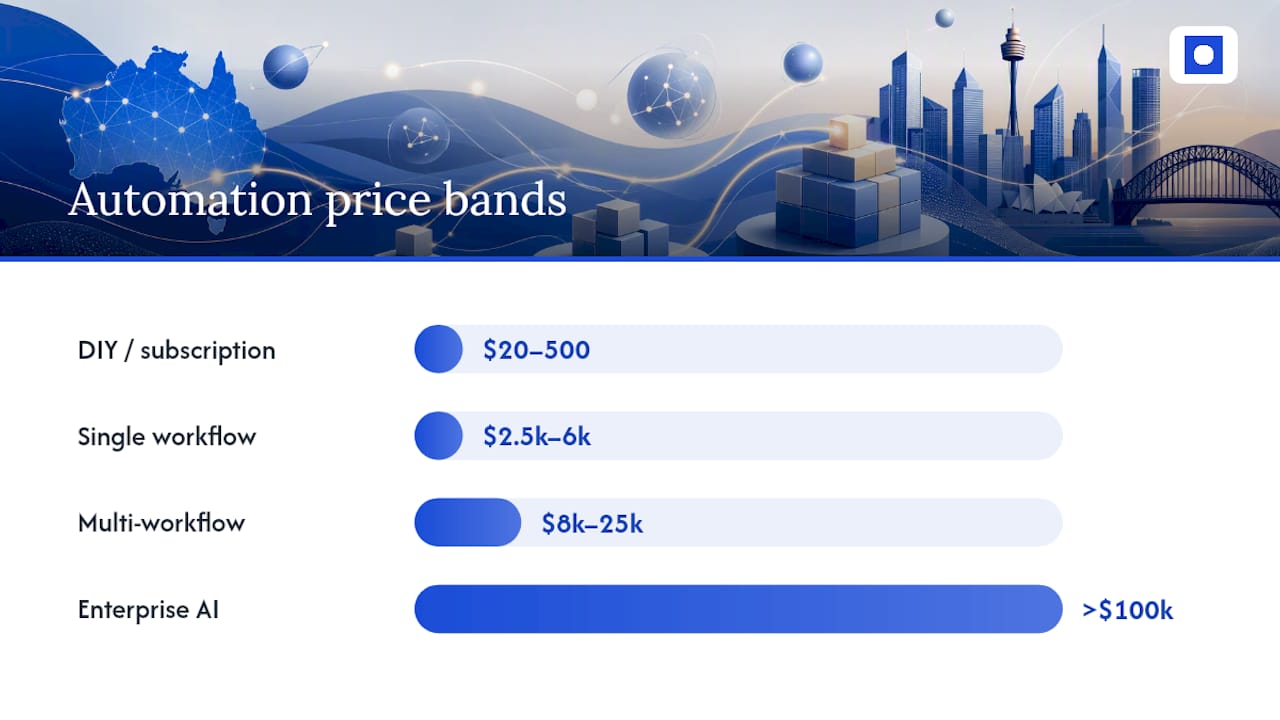
Custom AI builds and enterprise rollouts sit at the top. This is where a business wants AI models reading documents, making judgement calls, or running across dozens of approval chains. Industry reporting shows most first builds for small and medium businesses land in the low five figures, but a genuine enterprise programme with multiple AI agents and strict governance can run past $100,000.
Two things push the “typical first-year total” column above the raw build fee: licence costs stacking monthly, and AI model usage billed per task or per token. A $5,000 single workflow build with a $200 monthly licence adds $2,400 in year one alone. Always ask for the twelve-month number, not just the build quote.
What drives the price: six things you must ask about
Two businesses can get wildly different quotes for what sounds like “the same automation”. The gap almost always comes down to six variables.
- Workflow complexity. A linear task (move data from A to B) costs far less than one with branching logic, exceptions, and multiple decision points.
- Number of integrations. Every extra system you connect adds build and testing time, especially older software without a proper API.
- Data quality. Messy, inconsistent, or duplicated data forces cleanup work before automation can run reliably.
- Approval gates. Multi-step sign-off chains, especially ones needing an audit trail, add build time and ongoing compliance work.
- Platform and AI costs. Licence tiers and AI model token usage scale with volume, not just complexity.
- Testing and monitoring needs. A workflow touching customer data or finance systems needs more testing than an internal reporting task.
Data quality is the one businesses underestimate most. If your source data is inconsistent, expect to add 5% to 20% to your build budget for cleanup. Skip this step and the automation usually fails within months, not years.
Horizon AI’s Australian implementation data points to something worth knowing before you negotiate: most of the price premium in a quote comes from integration breadth and compliance work, not the AI model itself. A supplier quoting a high figure “because it uses AI” should be able to explain exactly which integration or approval gate is driving that cost. If they can’t, ask again.
Approval gates deserve particular attention if you’re in healthcare, aged care, NDIS services, or financial services. Every extra sign-off step with a required audit trail adds real build hours, and it adds ongoing maintenance every time a form or a policy changes.
Ongoing costs, hidden fees and a worked ROI example
The build fee is only part of the bill. Three recurring costs show up every month whether you notice them or not.
- Platform licences. Whatever software runs the automation (Power Automate, Zapier, or a custom-built system) usually charges a monthly or annual fee tied to volume.
- AI model or API usage. If the workflow calls an AI model to read documents or make decisions, you pay per task or per token, and this scales with how busy the workflow gets.
- Monitoring and support retainer. Automations fail quietly. An API changes, a password expires, a form field moves, and the workflow stops working without telling anyone. A support retainer, typically several hundred to over a thousand dollars per month, catches this before it shows up as a reporting error three weeks later.
Pro Tip: A quoted build fee that skips the twelve-month running-cost breakdown is a red flag. P2PIT’s pricing analysis found that suppliers who leave out licence and usage costs consistently understate the real first-year total. Ask for the full twelve-month number before you compare quotes.
Here’s a worked example you can redo with your own numbers. Say your accounts team spends 8 hours a week manually entering supplier invoices, at a fully loaded staff cost of $45 an hour. That’s $360 a week, or roughly $1,560 a month, in manual labour on one task.
An automated invoice workflow to fix this might cost several thousand dollars to build, plus monthly licence and monitoring fees in the low hundreds, resulting in a monthly running cost of several hundred dollars. Against a $1,560 monthly saving, that’s a net monthly gain of $1,110. Divide the $4,500 build cost by $1,110, and payback lands around four months. Everything after that is a genuine saving.
Swap in your own hours, staff rate, and quoted running costs, and you’ll get a realistic payback figure fast. Throughline Automation’s ROI calculator does this maths for you if you’d rather not run it by hand.
How a typical project runs, and realistic timelines
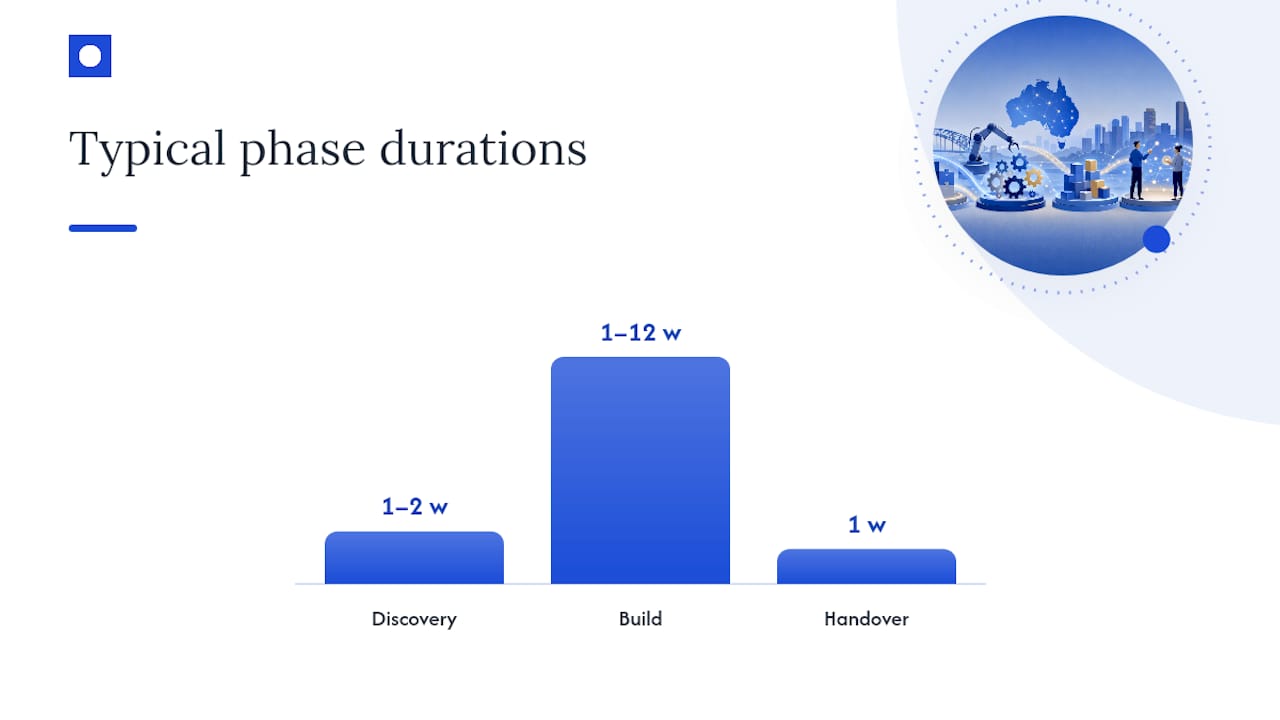
Every credible automation project starts with discovery, not a build. A proper discovery audit maps your current process, flags where data is messy, and identifies every system that needs to connect. It typically costs $1,000 to $5,000, and a supplier worth hiring credits that fee back against the build if you proceed. Microsoft’s own process design guidance makes the same point: clear process mapping before automation cuts down integration errors later.
After discovery comes the build, and timelines vary a lot by scope.
- Single workflow: one to four weeks from kickoff to handover.
- Multi-workflow programme: four to twelve weeks, depending on integration count.
- Enterprise rollout: several months, usually staged in phases rather than delivered all at once.
| Phase | What you get | Typical timeframe |
|---|---|---|
| Discovery/audit | Process map, cost breakdown, scoped quote | 1–2 weeks |
| Build | Working automation, tested against real data | 1–12 weeks |
| Handover | Runbook, monitoring setup, IP/code ownership | 1 week |
Handover matters more than most businesses expect. You should receive a runbook explaining how the automation works, monitoring alerts set up to catch failures, and clear ownership of the code and intellectual property. Without that, you’re locked into the supplier who built it for every future change.
Horizon AI recommends a staged pattern for larger projects: audit, then a small scoped build, then expand after 60 to 90 days of real usage data. Throughline Automation runs a version of this as a structured 90-day transformation, mapping the highest-cost manual work first, then building and handing over.
Compliance and data security: the Australian cost factor
If you handle health records, financial data, or personal information under the Privacy Act, your automation needs extra work most generic quotes don’t price in. This is especially true for healthcare, aged care, and NDIS providers, where client data carries strict handling obligations.
Expect three cost additions. First, data residency: some businesses require Australian-hosted infrastructure rather than default overseas cloud regions, which can affect platform choice and licence tier. Second, audit trails: every approval or data change needs a timestamped record, which adds build time to the workflow logic itself. Third, access controls: role-based permissions so only authorised staff can view or edit sensitive records, built into the automation rather than bolted on afterwards.
None of this is exotic, but it’s not free either. A workflow touching client health records will cost more to build and test than one moving internal sales data, purely because of the extra verification steps. Ask any supplier directly how they handle data residency and audit logging before you sign off on a quote. If they can’t answer clearly, that’s a bigger risk than the price difference.
Subscription, one-off fee, or per-user: which pricing model fits?
Australian automation providers price their work three main ways, and each suits a different situation.
Subscription pricing charges a recurring monthly or annual fee, usually tied to task volume or number of workflows running. This suits ongoing, evolving automation needs where you expect to add more workflows over time.
One-off project fees cover a defined build with a fixed scope, like the single workflow and multi-workflow bands above. This suits businesses that know exactly what they need automated and want a clear, finite cost rather than an open-ended relationship.
Per-user pricing charges based on how many staff access the platform, common with off-the-shelf tools like Power Automate or CRM-linked automation add-ons. This scales awkwardly for larger teams, since the licence cost climbs even if only a handful of people actually touch the automated process.
Most mid-sized Australian businesses end up mixing models: a one-off project fee for the custom build, plus a smaller subscription for the platform it runs on. Watch for suppliers who quote per-user pricing on a workflow that only three people will ever use. It’s rarely the cheapest option once volume grows.
Comparing costs across Australian automation providers
Pricing varies more by delivery model than by brand name. No-code subscription platforms sit at the cheap end but charge more as your task volume grows, and WebArt Design’s analysis notes that licence and volume pricing can exceed a professional custom build’s first-year cost once a workflow gets busy.
Freelance automation builders typically undercut agencies on the build fee but often skip the monitoring retainer, discovery audit, and documented handover. That’s a false saving. If nobody’s watching the workflow for failures, you’ll eventually pay for it in a broken report or a missed invoice.
Full-service implementation partners, including Throughline Automation, price around a defined project: discovery, build, and handover, with a support retainer as a separate line. This costs more upfront than a freelancer but includes the audit trail, testing, and monitoring setup that keeps the automation running past month three. For a business with 50 or more staff and multiple systems to connect, that structure matters more than shaving a few hundred dollars off the initial quote.
What most businesses get wrong about budgeting
The biggest budgeting mistake we see is treating the build fee as the whole cost. Licence fees and AI usage costs quietly double a first-year total that looked cheap on paper.
The second mistake is skipping the monitoring retainer to save money upfront, then losing weeks to a broken workflow nobody noticed. Discovery isn’t a sales tactic either. Mapping the process properly before building is what stops a $5,000 quote turning into a $15,000 rebuild.
— Throughline Team
Get a scoped quote instead of a guess
Reading price bands only gets you so far. The real number for your business depends on your systems, your data, and how many approval steps sit in the way. Throughline Automation’s free 30-minute automation assessment gives you a scoped answer instead of a rough estimate, based on the actual manual work slowing your team down.
In that call, we walk through your highest-cost manual workflows, whether that’s invoice processing, onboarding admin, or reporting, and flag which ones are worth automating first. If it’s a bigger job, our 90-day transformation maps, builds, and hands over measurable time and cost savings inside one quarter, rather than a drawn-out project with no fixed end point. It suits operations, finance, and HR teams in businesses with 50 or more staff who are tired of adding headcount to cover admin load.
There’s no cost and no obligation to the assessment itself. Book your free 30-minute automation assessment and get a clear, scoped answer on what automation would actually cost for your business.
Sources
- AI automation pricing in Australia: What it costs — P2PIT
- AI implementation cost Australia — Horizon AI
- Process design guidance — Microsoft Learn
FAQ
How do I automate my business processes?
Start with a discovery audit to map your highest-cost manual tasks, then build the automation in order of impact, starting with the workflow that wastes the most staff hours.
How much do AI automations cost?
A single AI-driven workflow typically costs $2,500 to $6,000 to build, while multi-workflow or enterprise AI programmes range from $8,000 to well over $100,000 depending on integration count and governance needs.
What is business process automation?
Business process automation uses software to handle repetitive, rules-based tasks, like data entry, approvals, or report generation, that staff currently do by hand.
Who are the top automation companies in Australia?
Australia’s automation market includes no-code platform providers, freelance builders, and full-service implementation partners like Throughline Automation, which builds custom workflows on top of a business’s existing software rather than requiring a system replacement.
How long does a business automation project take?
A single workflow typically takes one to four weeks to build and test, a multi-workflow programme runs four to twelve weeks, and enterprise rollouts are usually staged across several months.
Is a discovery audit necessary before automating?
Yes. Process mapping before automation reduces integration errors and helps set an accurate, scoped price instead of a rough estimate.