Finance process automation means using software to run routine finance tasks. Think invoice matching, bank reconciliation, and month end reporting, without a person doing it by hand. Australian finance teams report spending 40% or more of their time on manual work, according to a Budgetly survey. If that’s ten hours a week at $60 an hour, that’s $600 a week, or over $31,000 a year, on tasks a computer could do faster. Start by finding your highest-cost manual workflow.
TL;DR:
- Automating accounts payable and bank reconciliation offers the fastest return, with automation reducing invoice processing costs from over $27 to under $10 per invoice.
- Focus on automating repeatable, rule-based processes that pass through multiple people, especially when errors or delays cost time or money.
- Connect automation tools to existing systems instead of replacing core software, starting with OCR and RPA before adding AI for exception management.
- A 90-day plan involving discovery, quick wins, building, pilot testing, and handover can realize measurable savings and establish reliable workflows.
- Measure initial costs and time spent before automation to demonstrate ROI, with significant savings appearing within the first year for high-volume tasks like accounts payable.
Table of Contents
- Which finance processes should you automate first?
- What technology actually runs these automations?
- A 90-day plan to automate your finance processes
- How do you measure the return on finance automation?
- What goes wrong when finance teams automate?
- Our take on where finance automation actually pays off
- Book your free 30-minute automation assessment
- Sources
- FAQ
Which finance processes should you automate first?
Not every finance task is worth automating. The best candidates share four traits: they’re repeatable, rule-based, high volume, and pass through several people before they’re done.
Here are the processes that usually deliver the fastest payback:
- Accounts payable. Invoice capture, matching, and approval routing. Often the biggest time sink in finance.
- Accounts receivable. Invoice generation, payment matching, and chasing overdue accounts.
- Bank reconciliation. Matching bank feeds against ledger entries line by line.
- Month-end close tasks. Journal entries, accruals, and variance reports that repeat every single month.
- Expense claims. Receipt capture, policy checks, and approval chains.
- Reporting and forecasting feeds. Pulling numbers from multiple systems into one dashboard.
Each of these causes a specific kind of pain. Manual accounts payable delays’ supplier payments and creates errors that take hours to trace. Manual reconciliation eats a full day or more each month for mid-sized businesses, and it’s usually done at month end when everyone’s already stretched. Expense claims sitting in someone’s inbox for two weeks delay reimbursement and annoy staff.
Use this checklist before you commit to automating a process:
- Does it happen the same way every time, with clear rules?
- Does it happen often enough to matter (daily, weekly, or at least monthly)?
- Does it pass through two or more people or systems before it’s finished?
- Does an error here cost real money or real time to fix?
If you answer yes to three or four of those, it’s a strong candidate. A business processing 500 invoices a month manually might spend three to five minutes per invoice on data entry and matching. Automate that step and it drops to seconds, with the exceptions flagged for a human to check. That’s the pattern worth chasing: not full automation, but automation of the repetitive 80%, so your team can focus on the 20% that actually needs judgment.
What technology actually runs these automations?
Four different tools get lumped together under “automation,” and mixing them up leads to buying the wrong thing.
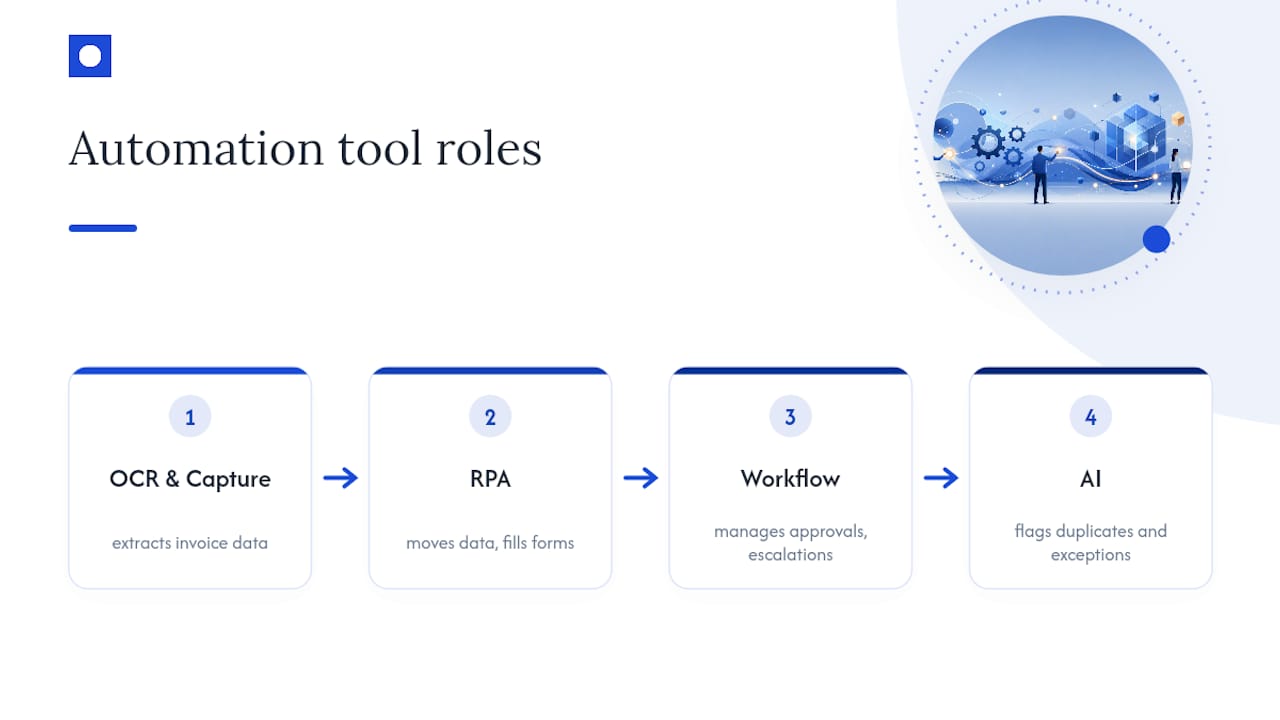
OCR and data capture reads scanned invoices, receipts, and PDFs, and turns them into structured data. Instead of someone typing invoice numbers and line items into your accounting system, the software extracts them automatically. This is usually the first piece finance teams install, because it removes the most tedious manual data entry work in accounts payable.
Robotic process automation (RPA) mimics what a person does on a screen. It moves data between systems, fills in forms, and triggers approvals, following the exact steps a human would follow, just faster and without errors. IBM’s overview of finance automation frames RPA as the workhorse for rule-based, repetitive tasks that don’t need judgment calls.
Workflow engines manage the human side. approvals, sign-offs, escalations, when a task needs a person, to make a decision. RPA and workflow engines often work together: RPA handles the data, the workflow engine handles who needs to approve what and when.
Intelligent automation and AI step in for pattern recognition and exceptions. AI can flag an invoice that looks like a duplicate, predict which customers are likely to pay late, or catch a coding error before it hits your ledger. This is where governance matters most, because AI makes judgment calls, not just data moves, and someone needs to be able to explain why it flagged something.
KPMG’s research found robotic process automation is already one of the top areas where Australian finance teams see real value, with many organisations using, piloting, or planning AI for reporting, accounting, and financial planning work.
The advice that matters most: don’t replace your accounting or ERP system to automate around it. Connect automation tools to what you already run. Replacing core systems is expensive, slow, and risky. Integrating on top of your existing software gets you the same time savings without the disruption.
Pro Tip: Start with OCR and RPA on accounts payable before touching AI-driven exception handling. Get the basics working reliably first, then layer in the smarter tools once your team trusts the system.
A 90-day plan to automate your finance processes
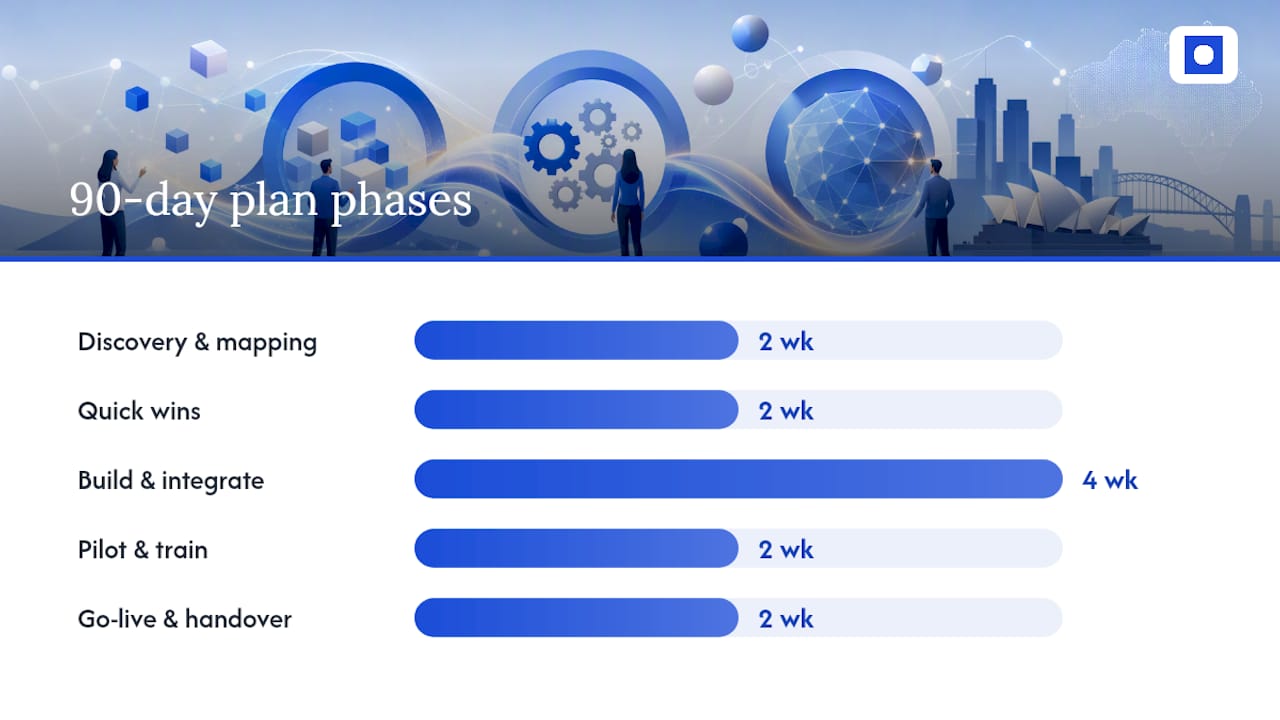
You don’t need a two-year IT project to get real results. A focused 90-day approach, working through discovery, quick wins, build, pilot, and handover, gets measurable savings without disrupting your team’s day-to-day work.
- Weeks 1 to 2: Discovery and mapping. Map your highest-cost manual workflows using an AI Diagnostics Engine — Revenue System Analysis. Record volumes (invoices per month, reconciliations per week) and how long each step takes. This is where you find your real numbers, not guesses.
- Weeks 3 to 4: Quick wins. Start with accounts payable capture, simple approval routing, and bank reconciliation matching. These processes have the clearest rules and the fastest payback.
- Weeks 5 to 8: Build and integrate. Connect the automation to your accounting or ERP system. Set rules for what counts as an exception, and test with real sample data before going live.
- Weeks 9 to 10: Pilot and train. Run it alongside your existing process for a short period. Train the team on what changes, and agree on who checks exceptions.
- Weeks 11 to 12: Go-live and handover. Switch over fully, measure against your baseline numbers, and hand over ongoing monitoring to a named owner in the finance team.
This staged pattern mirrors Throughline Automation’s 90-day transformation model, which maps high-cost manual work before building anything, so nothing gets automated on a guess.
By the end of the 90 days, you should walk away with:
- A documented process map of what was automated and why.
- A baseline of your key numbers (time per invoice, reconciliation hours, error rate) before and after.
- A list of known exceptions and how they’re handled.
- A simple runbook: what the automation does, who owns it, and what to check if something breaks.
- An audit trail showing what happened and when, for compliance and peer review.
Pro Tip: Don’t skip the baseline measurement in week 1 or 2. If you don’t know your current cost per invoice or hours spent on reconciliation, you can’t prove the automation worked, and you’ll struggle to get budget for the next phase.
Scale Suite’s benchmark research on Australian SMEs found business owners typically spend 8 to 12 hours a week on finance admin, and that cleaning up an accounting setup before automating usually takes three to eight weeks. Build that cleanup time into your discovery phase rather than skipping straight to the build.
How do you measure the return on finance automation?
The ROI formula is simple: hours saved × hourly labour cost, plus errors avoided, plus early-payment discounts captured.
Here’s a worked example. Say your team processes 400 invoices a month, spending five minutes each on manual entry and matching. That’s roughly 33 hours a month. At $55 an hour, that’s $1,815 a month, or nearly $21,780 a year, just in labour time on data entry alone.
Cost per invoice is the number to watch closely. Industry reporting shows a paper or PDF invoice can cost Australian businesses $27 to $31 to process manually, against under $10 for electronic processing. One detailed example puts automated invoice processing as low as about $1 per invoice, once volume is high enough to justify the setup.
| Metric | Manual process | Automated process |
|---|---|---|
| Cost per invoice (paper/PDF) | $27 to $31 | Under $10 |
| Cost per invoice (high-volume automated) | Not applicable | About $1 |
| Time per invoice | 3 to 5 minutes | Seconds, with exceptions flagged |
Track these KPIs once you’ve automated a process:
- Cycle time: how long from invoice received to payment approved.
- Exception rate: how many invoices or transactions need a human to step in.
- Error rate: duplicate payments, miscoded entries, missed discounts.
- Days payable outstanding: whether faster processing is improving or hurting supplier relationships.
An ROI calculator can help you model your own hours, labour rate, and expected savings before you commit budget to a project.
What goes wrong when finance teams automate?
Most automation failures come down to four things: scoping the project too broadly, underestimating exceptions, skipping stakeholder buy-in, and building automations too brittle to handle real-world variation.
AI-driven tools raise a separate concern. Avalara’s survey found many Australian finance leaders are deploying AI agents faster than their governance can keep up, meaning audit trails, explainability, and approval gates often arrive after the fact, not before.
Mitigate this by piloting small, keeping a human in the loop for exceptions, and logging every automated decision so it’s reviewable. Involve your finance and audit teams from day one, not after the system’s already live.
Pro Tip: Before go-live, write a one-page checklist: who approves exceptions, who checks the audit log weekly, and who gets notified if the automation fails. It takes twenty minutes and saves a lot of confusion later.
Our take on where finance automation actually pays off
Finance teams overestimate the complexity of automation and underestimate the payback speed. Accounts payable, done well, often returns its cost within a year at fairly modest invoice volumes. The gap isn’t technology. It’s teams trying to automate everything at once instead of starting with the process bleeding the most hours.
We’ve seen the same pattern across finance functions: map the workflow, automate the repetitive 80%, and let people handle the judgment calls. If you want a clear picture of where your own hours are going, book a free 30-minute automation assessment and we’ll show you.
— Throughline Team
Book your free 30-minute automation assessment
Most finance teams already know something’s taking too long, they just haven’t put a number on it. Throughline Automation’s free 30-minute assessment does that for you: we map your highest-cost manual workflows, show you where the hours and dollars are leaking, and hand you a clear next step.
This isn’t a sales pitch dressed up as advice. It’s a genuine look at your accounts payable, reconciliation, or reporting processes, the same discovery work that kicks off our 90-day transformation approach. We integrate with the accounting and ERP systems you already run, so there’s no rebuild and no migration headache, just automated finance workflows built around what you’ve got.
Want to see the numbers before you talk to anyone? Try the automation ROI calculator first. Either way, the next step is the same: book your free assessment and find out what your manual finance work is actually costing you.
FAQ
How can I automate my finance processes?
Start by mapping your highest-volume, most repetitive workflow, usually accounts payable or bank reconciliation. From there, add OCR for data capture, RPA for moving data between systems, and a workflow engine for approvals, integrating each with your existing accounting software rather than replacing it.
What are RPA tools used for in finance?
Robotic process automation handles rule-based, repetitive tasks like data entry, invoice matching, and moving information between systems, following the same steps a person would but without manual keying. IBM’s finance automation overview describes RPA as the workhorse for exactly these high-volume, low-judgment tasks.
Is AI replacing RPA in finance?
No. AI and RPA solve different problems. RPA moves data and follows fixed rules, while AI handles judgment calls like flagging anomalies or predicting late payments. Most finance teams use both together, with KPMG noting RPA remains a top source of value even as AI adoption grows.
What is RPA in a finance department?
RPA in finance is software that performs repetitive digital tasks, like entering invoice data, reconciling transactions, or generating reports, by mimicking the clicks and keystrokes a person would make. It works best on high-volume, rule-based work with clear, unchanging steps.
How long does it take to see results from finance automation?
A focused rollout on one or two processes, such as accounts payable, can show measurable time savings within weeks of go-live. A full transformation across multiple finance workflows, using a staged 90-day approach like Throughline Automation’s, typically delivers a documented baseline, working automations, and a handover within three months.