Automating invoice processing and admin cuts manual data entry, speeds up payments, and reduces costly errors. The Australian Taxation Office puts manual processing at between AU$16 and AU$27.67 per invoice. For example, manually processing 100 invoices a month could cost over AU$33,000 annually. The next step is simple: map your invoice volume, then book a free 30-minute automation assessment.
TL;DR:
- Automating invoice processing can significantly cut costs, with manual processing costing between AU$16 and AU$27.67 per invoice.
- The automation chain includes capture, extraction, validation, approval routing, scheduling, payment, and reconciliation, which minimizes manual tasks and errors.
- Proper process mapping and simplification are essential before automation to prevent amplifying existing inefficiencies or exceptions.
- Implementing a phased rollout over 90 days, with KPIs tracking, ensures sustainable improvements and allows adjustments based on real invoice data.
- A free 30-minute assessment helps determine the potential savings and feasibility of automation tailored to your invoice volume and workflows.
Table of Contents
- How does invoice automation actually work?
- What are the real benefits and savings?
- What are the biggest pitfalls, and how do you avoid them?
- How do you roll this out in 90 days?
- Which automation approach suits your business?
- What we see work, and what we avoid
- Book your free 30-minute automation assessment
- Sources
- FAQ
How does invoice automation actually work?
Invoice automation isn’t one tool doing one job. It’s a chain of steps, each one removing a manual task from someone’s desk.
Here’s how the process runs in practice:
- Capture. Invoices arrive by email, supplier portal, Peppol network, scanned PDF, or API feed from a supplier system. Good automation pulls from all of these into one queue.
- Extraction. Optical character recognition and intelligent document processing (IDP) read the invoice and pull out fields: supplier, ABN, amount, due date, line items. Each field gets a confidence score. Low-confidence fields get flagged for a human to check, rather than guessed at.
- Validation and matching. The system matches the invoice against a purchase order or contract, checks the supplier’s ABN, and confirms the amount makes sense against what was ordered.
- Approval routing. Rules send the invoice to the right approver based on amount, cost centre, or supplier. Anything that doesn’t fit a rule goes to an exception queue with a clear owner and a deadline.
- Scheduling and payment. Approved invoices get batched and scheduled for payment based on due date and cashflow position.
- Reconciliation. Payments post back into your ERP or accounting system. This step needs to be idempotent, meaning a retry or a system hiccup never creates a duplicate payment or a duplicate ledger entry.
Peppol routing uses your ABN as the delivery address, and you typically register through an accredited access point rather than building this yourself. The software handles formatting and delivery in the background.
Admin automation sits alongside this chain rather than inside it. Supplier onboarding, bank detail verification, and monthly reporting are separate workflows that feed the same exception rules and approval logic, so you’re not maintaining two different rulebooks.
What are the real benefits and savings?
The ATO’s benchmark is the most useful number in this entire topic because it’s re-runnable. If manual processing costs AU$16 to AU$27.67 per invoice, multiply that by your monthly invoice count and you have your baseline cost.
Beyond labour cost, e-invoicing through Peppol gets you paid 2.5 days faster on average than traditional paper or PDF invoices, because there’s no manual rekeying delay on either end. For a business managing tight cashflow, that’s real money sitting in the bank sooner rather than later.
Fewer manual touches also means fewer mistakes. Every time a human retypes an invoice number or bank account detail, there’s a chance of error, and every error is an opportunity for fraud. Automated ABN checks and duplicate-detection rules close that gap.
For a rough return on investment, take your monthly invoice count, multiply by the low end of the ATO benchmark, and compare that to what a conservative straight-through processing rate would save you. If 60% of invoices flow through with no human touch, you’re saving on that portion immediately. Smaller finance teams often see the fastest payback, since a single AP officer typically handles a large share of the workload and platform costs for small business sit around AU$200 to AU$600 a month. Our ROI calculator can help you model this against your own numbers.
What are the biggest pitfalls, and how do you avoid them?
Most automation failures aren’t technology failures. They’re process failures wearing a technology costume.
- Automating a broken process. If your approval chain is already a mess of exceptions and workarounds, automating it just makes the mess move faster. Map and simplify the process first, before you touch a tool.
- Weak ERP integration. One-way data pushes without proper sync create mismatches between systems. Insist on two-way sync and idempotent posting, so a retry never duplicates a payment.
- Template-bound extraction. Extraction tools trained on a narrow set of invoice layouts fall over the moment a new supplier sends something different. Test on your actual invoice mix, not a demo dataset.
- Poor exception handling. Every exception needs a named owner and a deadline. Without that, exceptions pile up and become the new bottleneck.
- Fraud and duplicate payments. Bank detail changes should trigger a verification step every time, and duplicate-detection rules should run automatically before payment, not after.
Approval workflow design is often where the real gains hide, more than swapping one OCR engine for another. A well-structured approval workflow removes far more friction than a marginally better extraction accuracy score.
Pro Tip: Before you sign off on any automation tool, run 20 of your messiest real invoices through it. If it can’t handle your worst suppliers, it can’t handle your business.
How do you roll this out in 90 days?
A phased rollout beats a big-bang launch every time. Here’s a sequence that works.
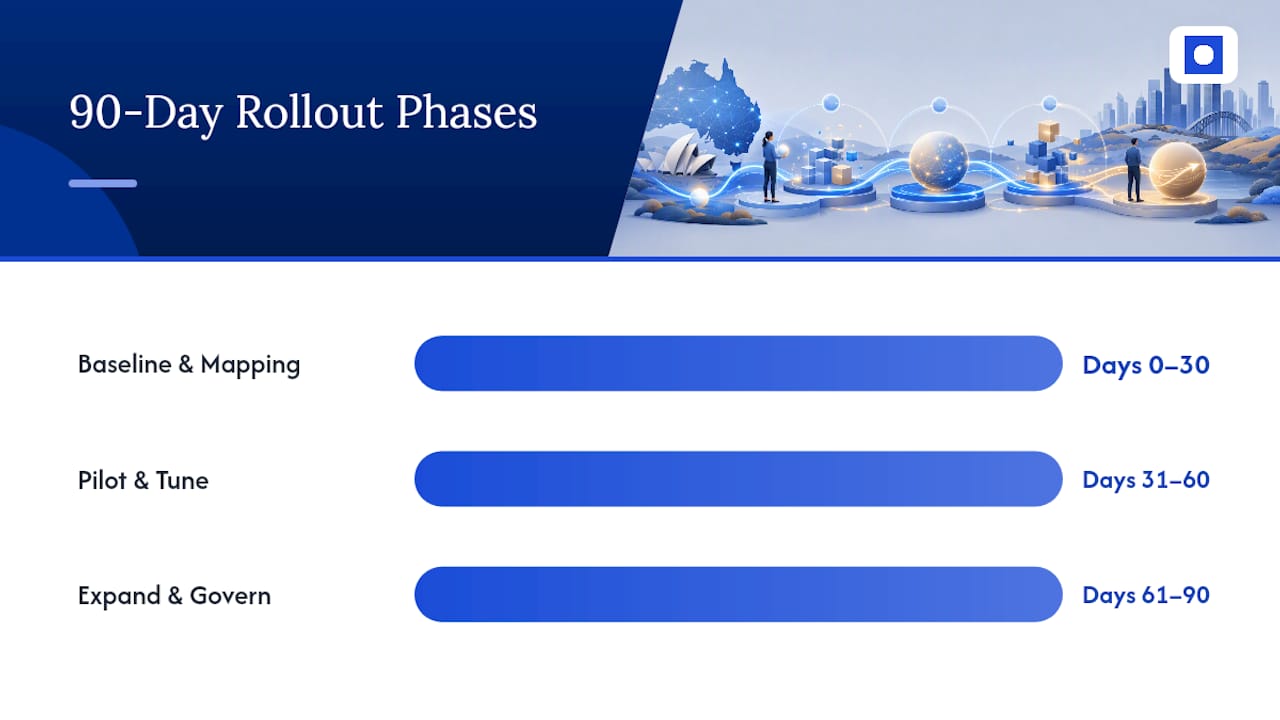
- Days 0 to 30: baseline and mapping. Record your current cost per invoice, cycle time, and error rate. Map the full workflow from receipt to payment. Clean up your vendor master data. Pick one pilot vendor group with straightforward, representative invoices.
- Days 31 to 60: pilot and tune. Run the pilot with real suppliers. Track extraction accuracy and exception rate weekly. Adjust matching rules and approval thresholds based on what actually breaks.
- Days 61 to 90: expand and govern. Roll out to more suppliers. Lock in governance controls: idempotency checks, change control on rule updates, full audit logging, and role-based approval limits. Hand over named owners for ongoing tuning.
Track these KPIs from day one: cost per invoice, straight-through processing rate, cycle time from receipt to payment, exception rate, and duplicate-payment prevention rate. Structured KPI tracking across a phased rollout is what turns a pilot into a durable result rather than a short-lived improvement that quietly decays.
This 90-day structure mirrors how Throughline Automation runs client transformations, though the sequence holds regardless of who builds it for you.
Which automation approach suits your business?
Three broad approaches exist: a bolt-on invoice tool, a module inside your existing ERP, or a managed automation build that connects your existing systems together.
- Bolt-on tools are quick to start but often need manual reconciliation back into your ERP, which adds a hidden step you didn’t budget for.
- ERP modules integrate cleanly if your ERP vendor supports one, but they can lock you into that vendor’s roadmap and pricing.
- Managed automation connects to the tools you already run without forcing a system change, which suits businesses that don’t want to migrate platforms just to fix admin work.
Whichever you choose, don’t compromise on four things: two-way ERP sync, idempotent processing, exception SLAs with named owners, and Peppol or ATO compliance if you’re using e-invoicing.
For your 30-day decision plan: scope your invoice volume and pain points, shortlist no more than three options, run a small trial with real invoices, and get executive sign-off before full rollout. Budget for both software and a project lead’s time, whether that’s internal or a partner such as Throughline Automation’s integration approach.
What we see work, and what we avoid
We fix the process before we touch the software. That order matters more than which extraction tool a client picks.
The clients who get the biggest wins aren’t the ones with the fanciest tech. They’re the ones willing to simplify a messy approval chain before automating it. Time saved on invoice processing routinely runs into dozens of hours a month for a mid-sized finance team, and exception rates drop sharply once ownership and SLAs are clear.
If you want to know what that looks like for your invoice volume, book a free 30-minute automation assessment and we’ll walk through it with you.
— Throughline Team
Book your free 30-minute automation assessment
Throughline Automation is the alternative to hiring another AP officer. We connect the finance systems you already run instead of asking you to replace them.
The free 30-minute assessment gives you a baseline estimate of your current cost per invoice, a suggested pilot scope based on your actual supplier mix, and a straight answer on whether automation makes sense for your volume right now. There’s no obligation attached. If it makes sense, the next step is the 90-day transformation process, where we map your highest-cost manual workflows, build the automations, and hand over measurable time and cost savings.
Because automation can integrate with your existing software stack rather than forcing a migration, your team keeps working in the tools they already know. Book your free assessment and get a clear picture of what automating invoice processing could save your business.
Sources
- Peppol eInvoicing value assessment: cost calculations (ATO)
- Why so many functional automation projects fail (Jama Software blog)
- A guide to e-invoicing in Australia (Stripe)
- Why IDP implementations fail: 8 finance-specific pitfalls (Invoice Data Extraction)
FAQ
Is there a way to automate invoices?
Yes. Invoice capture, data extraction, approval routing, and payment scheduling can all be automated, with humans only reviewing flagged exceptions rather than every invoice.
Can AI be used to automate invoice processing?
Yes, AI-based intelligent document processing (IDP) reads invoice fields and assigns confidence scores, flagging low-confidence extractions for human review rather than guessing.
What is the best invoicing software for small businesses in Australia?
There’s no single best option. It depends on invoice volume, existing ERP, and whether Peppol e-invoicing is required. A managed automation approach like Throughline Automation’s business process automation suits businesses that want existing systems integrated rather than replaced.
What is a KPI for invoice processing?
Common KPIs include cost per invoice, straight-through processing rate, cycle time from receipt to payment, exception rate, and duplicate-payment prevention rate. Track these from day one of any rollout.