Yes, you can automate manual tasks without ripping out your systems. Start with one high-value workflow, like invoice handoffs or onboarding emails, and run a short pilot. Map that single process this week. Then book a 30-minute discovery call before touching anything else.
TL;DR:
- Prioritize automating tasks with high pain and impact scores while keeping effort low, focusing on repetitive and rule-based workflows like data entry or reporting.
- Use non-invasive integration methods such as CSV bridges, iPaaS connectors, webhooks, or RPA tools to connect existing systems without overhauling your infrastructure.
- Conduct a 30-day parallel run when implementing automation to identify silent failures and ensure the process works reliably before full deployment.
- Start with small pilots costing $3,000 to $10,000, aiming for a payback period under six months based on time saved and staff hourly rates.
- Engage staff early by communicating the benefits clearly, involving a point person for questions, and demonstrating the accuracy of the automation through side-by-side comparisons.
Table of Contents
- How do you pick which manual process to automate first?
- Which integration options avoid a system overhaul?
- How do you test and roll out automation safely?
- What does automation cost and how fast does it pay back?
- How do you get staff to actually use the new system?
- What are the data security and compliance risks?
- Will the automation still work as your business grows?
- What does this look like in a real workflow?
- What usually goes wrong?
- Throughline’s approach: why integration-first wins for mid-size teams
- Book your free 30-minute automation assessment
- Sources
- FAQ
How do you pick which manual process to automate first?
Not every manual task deserves automation. Some cost you an hour a week. Others cost you fifteen and cause errors that annoy customers. You need a way to sort them, and the simplest one is called PIE: Pain, Impact, Effort.
Score every candidate task from 1 to 5 on each letter:
- Pain — how much does the team hate doing this task?
- Impact — how many hours per week does it eat, and how many people touch it?
- Effort — how hard is it to automate, given your current tools?
Add Pain and Impact, then divide by Effort. High scores go first. A task with high pain, high impact, and low effort should be your pilot.
To turn that into money, multiply time by frequency. A 10-minute task done 50 times a week is 500 minutes, or over 8 hours of staff time saved weekly once automated. At $45 an hour loaded cost, that is roughly $360 a week, or nearly $19,000 a year, for one workflow.
Common first candidates score well because they are repetitive and rule-based, not judgement calls:
- Data entry from forms, PDFs, or emails into your CRM or accounting system
- Invoice matching and approval handoffs between finance and operations
- Onboarding emails and document requests for new staff or new clients
- Weekly or monthly reporting that currently means copying numbers between spreadsheets
Before your first discovery meeting, spend five minutes answering this: which task does someone complain about every week, how many hours does it eat, and what tools does it touch right now? That answer is your starting point.
Which integration options avoid a system overhaul?
You do not need a new platform to automate the work sitting on top of your existing software. Five patterns cover almost every situation a mid-sized business runs into, and most legacy-to-modern integration needs fall into one of them.
- CSV-to-API bridge: turns a scheduled export or report into a live data feed. No changes to the old system required.
- iPaaS (integration platform as a service): connector tools like Zapier or Make link two apps through their existing APIs, with minimal custom code.
- Webhook shim: a small piece of code that listens for an event in one system and pushes it into another the moment it happens.
- Durable queue: holds tasks in order and retries them if something fails, so nothing gets lost during a network hiccup or an app outage.
- RPA (robotic process automation): software that clicks and types through the same screens your staff use, useful when a system has no API at all.
Here is when each one earns its place:
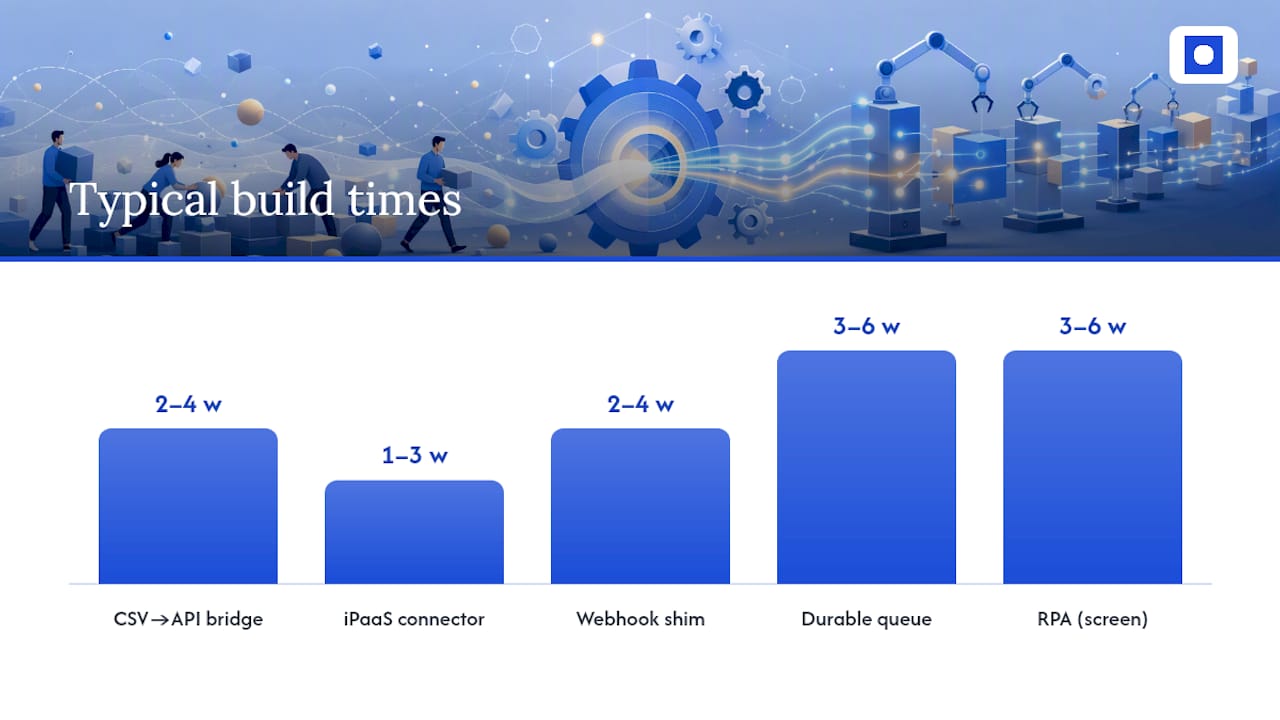
| Pattern | Best for | Typical build time | Watch out for |
|---|---|---|---|
| CSV-to-API bridge | Legacy finance or payroll systems with scheduled exports | 2 to 4 weeks | Depends on export accuracy and timing |
| iPaaS connector | Standard apps with published APIs (CRM, email, HR tools) | 1 to 3 weeks | Can hit usage limits at high volume |
| Webhook shim | Real-time handoffs, like a new lead triggering a task | 2 to 4 weeks | Needs monitoring if the source app changes its format |
| Durable queue | High-volume processing where losing a record is costly | 3 to 6 weeks | Adds infrastructure to maintain |
| RPA | Old systems with no API, screen-based workflows only | 3 to 6 weeks | Breaks when the screen layout changes |
A finance team stuck on an ageing accounts payable system might use a CSV-to-API bridge to pull invoice exports into a matching tool overnight. An HR team onboarding new starters across three apps might use an iPaaS connector to fire off welcome emails and provision accounts the moment a contract is signed. An operations team dealing with a rostering system that has no public API might lean on RPA to bridge the gap, automating the screens directly rather than waiting for a vendor to build one.
RPA is the most pragmatic option when nothing else will connect, but it is also the most fragile: a vendor update to the screen layout can break it overnight. Whichever pattern you choose, someone needs to own it, watch for failures, and know how to fix a broken connection fast.
How do you test and roll out automation safely?
The biggest mistake is automating a broken process. If your invoice approval chain already has three unnecessary sign-offs, automating it just makes the mess move faster. Fix the process before you automate it.
Once the process is clean, follow this sequence:
- Map the current process end to end, including every handoff and exception.
- Remove obvious waste: duplicate approvals, unnecessary CC chains, manual double-checks that add no value.
- Build the automation using the integration pattern that fits your system.
- Run it in parallel with the manual process for at least 30 days, with one named person checking both outputs match.
- Switch over only once discrepancies drop to zero for a full reporting cycle.
The 30-day parallel run is not optional. It is the single most reliable way to catch a silent failure, like a duplicate invoice or a missed record, before it costs you real money.
Pro Tip: Log every discrepancy during the parallel run in a shared spreadsheet, even the tiny ones. Patterns show up after a week that you would never spot from a single mismatch.
Before you flip the switch permanently, lock in four things: who approves changes to the automation, who monitors it day to day, what triggers an alert, and what the rollback plan looks like if something breaks. Automations need retries built in for network failures, and they need to be idempotent, meaning running the same task twice does not create two invoices instead of one.
What does automation cost and how fast does it pay back?
A small pilot workflow typically costs $3,000 to $10,000 and takes 2 to 8 weeks to build, depending on how many systems it touches and how messy the data is. No-code connector tools are usually the cheaper starting point for simple flows; custom development earns its cost when the logic is complex or the volume is high.
The maths on one workflow: a 10-minute task repeated 50 times a week adds up to over 8 hours of staff time saved weekly. At $45 an hour, that is $360 a week, or close to $18,700 a year, from a single automated task.
To present this to leadership, keep it simple:
- Hours saved per week × loaded hourly cost = weekly saving
- Weekly saving × 52 = annual saving
- Annual saving ÷ pilot cost = payback period in months
If the payback lands under six months, it is an easy approval. If it stretches past twelve, question whether the workflow is worth automating yet, or whether the process needs simplifying first.
How do you get staff to actually use the new system?
Automation fails when people work around it, not when the technology breaks. Staff need to trust the new process before they will drop the old habit.
Tell the team early what is changing and why, in plain terms. “This will stop you retyping the same invoice into two systems” lands better than a technical explanation of the integration.
Keep one person in each affected team as the point of contact during the transition. They answer questions, flag issues, and feed problems back to whoever owns the automation. This matters more than any training document.
Run the parallel period loudly, not quietly. Show staff the manual and automated outputs side by side so they can see the automation is accurate, not just faster. Trust builds from seeing it work, not from being told it will.
Expect resistance from whoever currently owns the manual task. Their job is changing, and they may worry it is disappearing altogether. Be upfront: automation usually shifts people toward reviewing exceptions and handling judgement calls, not toward redundancy.
What are the data security and compliance risks?
Automating around existing systems still means moving sensitive data, invoices, payroll details, client records, between tools. Every connection point is a place data can leak or be accessed by the wrong person.
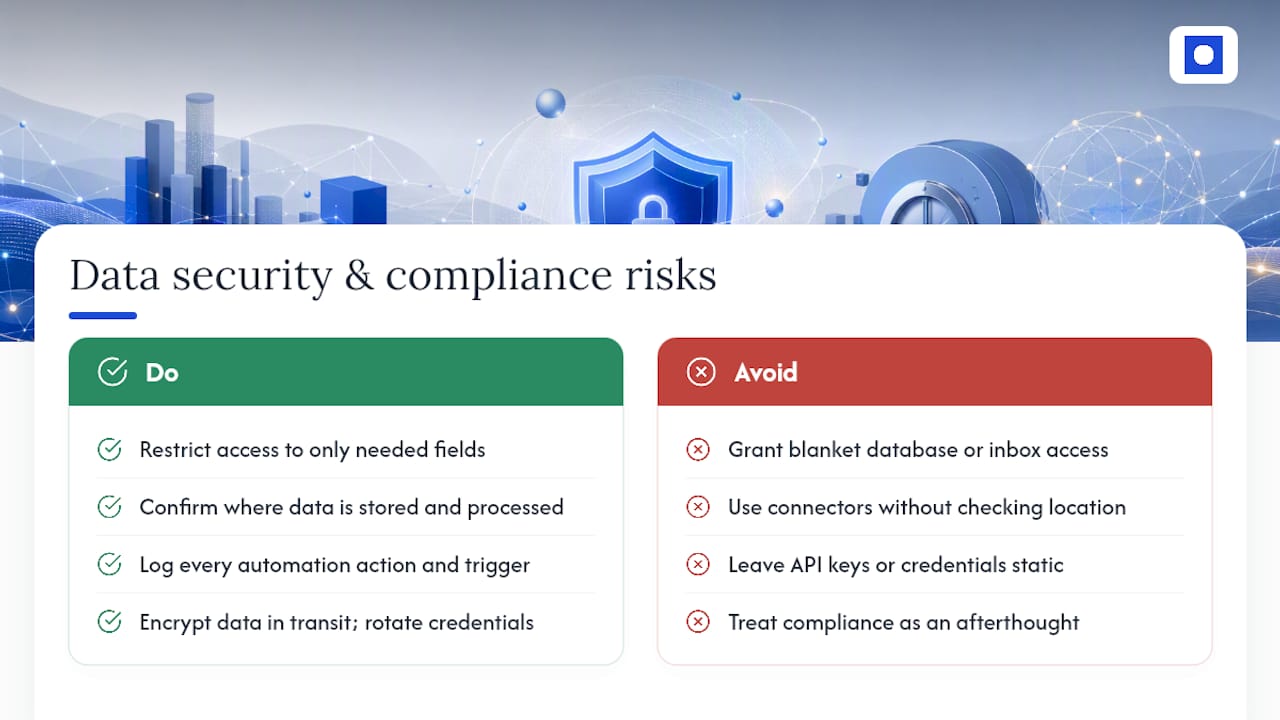
Keep access tight. Automations should only read and write the specific fields they need, not have blanket access to an entire database or inbox.
Check where data physically sits. If you use an overseas connector tool, confirm where it stores and processes information, especially for HR or health records subject to privacy obligations under Australian or New Zealand law.
Log everything. A good automation keeps a record of every action it takes, who or what triggered it, and when. This matters for audits and for tracing what went wrong if a record ends up incorrect.
Build in encryption for data in transit between systems, and rotate any API keys or credentials on a schedule rather than leaving them static indefinitely. If your industry has specific compliance rules, aged care, healthcare, or financial services, treat those rules as fixed constraints on the automation design, not an afterthought to fix later.
None of this requires replacing your core systems. It requires designing the connection between them carefully, and reviewing that design at least once a year as tools and regulations change.
Will the automation still work as your business grows?
An automation built for 50 invoices a week can choke at 500. Plan for growth before it becomes a problem, not after.
Durable queues handle volume spikes better than simple point-to-point connections, because they hold tasks in order and retry automatically rather than dropping records under load. If your pilot workflow is likely to scale fast, this is worth building in from the start rather than retrofitting later.
Maintenance is not a one-off cost. RPA scripts break when a vendor changes a screen layout. iPaaS connectors change their pricing tiers as usage grows. CSV bridges fail quietly if an export format shifts. Someone needs to own watching for these changes, ideally the same person who monitors the automation day to day.
Review each automated workflow every six to twelve months. Ask whether volume has changed, whether the source systems have been updated, and whether the process it automates still matches how the business actually works. A workflow that made sense a year ago may need adjusting as your team or client base grows.
What does this look like in a real workflow?
Consider a typical mid-sized recruitment agency processing timesheets from casual staff across multiple client sites. Timesheets arrive by email, PDF, or a client portal, and someone manually re-keys hours into payroll every week.
A CSV-to-API bridge or a webhook shim can pull that data into the payroll system automatically, flagging anything that does not match expected hours for a human to check. The manual task shrinks from hours of re-keying to minutes of exception review.
A property management business chasing maintenance requests across email, phone, and a tenant portal faces a similar pattern: no single system holds the whole picture, but a connector layer can route each request to the right tradesperson and log it automatically, without replacing the property management software already in use.
In both cases, the win is not a shiny new platform. It is removing the manual bottleneck between systems that already work fine on their own. Throughline Automation’s what we automate page runs through more examples across finance, HR, and operations for businesses in a similar position.
What usually goes wrong?
The most common and costly mistake is automating a process nobody has questioned in years. If three people currently approve every invoice because of a fraud incident from 2019 that no longer applies, automating that three-step chain just locks in the inefficiency permanently.
Silent failures are the second biggest risk. An automation that fails without anyone noticing can quietly duplicate records, skip transactions, or send the wrong information for weeks before anyone catches it. This is exactly why a 30-day parallel run with a named owner matters more than any other single safeguard.
Scope creep kills pilots too. Teams get excited after one win and try to automate five processes at once before proving the first one works reliably. Pilot-first approaches, one workflow, a parallel run, then measurement, deliver faster payback and better adoption than trying to do everything simultaneously.
Finally, watch for the assumption that automation means “set and forget.” Every automated workflow needs a named owner checking it periodically, even after the parallel run ends. Without that, small errors accumulate unnoticed until someone finds a costly surprise at quarter-end.
Throughline’s approach: why integration-first wins for mid-size teams
Throughline Automation runs every engagement through a defined 90-day transformation: map the highest-cost manual workflows first, build and integrate the automation around your existing tools, then hand over measurable time and cost savings.
Nothing gets replaced. The automation sits on top of the software your team already knows, connected through the same patterns covered above: CSV bridges, connector platforms, or RPA where legacy systems demand it.
The process starts with a free 30-minute assessment. Bring your worst manual task, the tools it touches, and a rough idea of how often it happens. That is enough to identify whether it is a strong pilot candidate.
Clients span operations, finance, HR, and customer service teams in organisations from 50 to over 1,000 staff, including healthcare, aged care, property, and professional services businesses carrying growing administrative load without wanting to solve it by hiring more people.
— Throughline Team
Book your free 30-minute automation assessment
If you have read this far, you likely already know which manual task is costing your team the most hours. That is exactly what the free assessment is for.
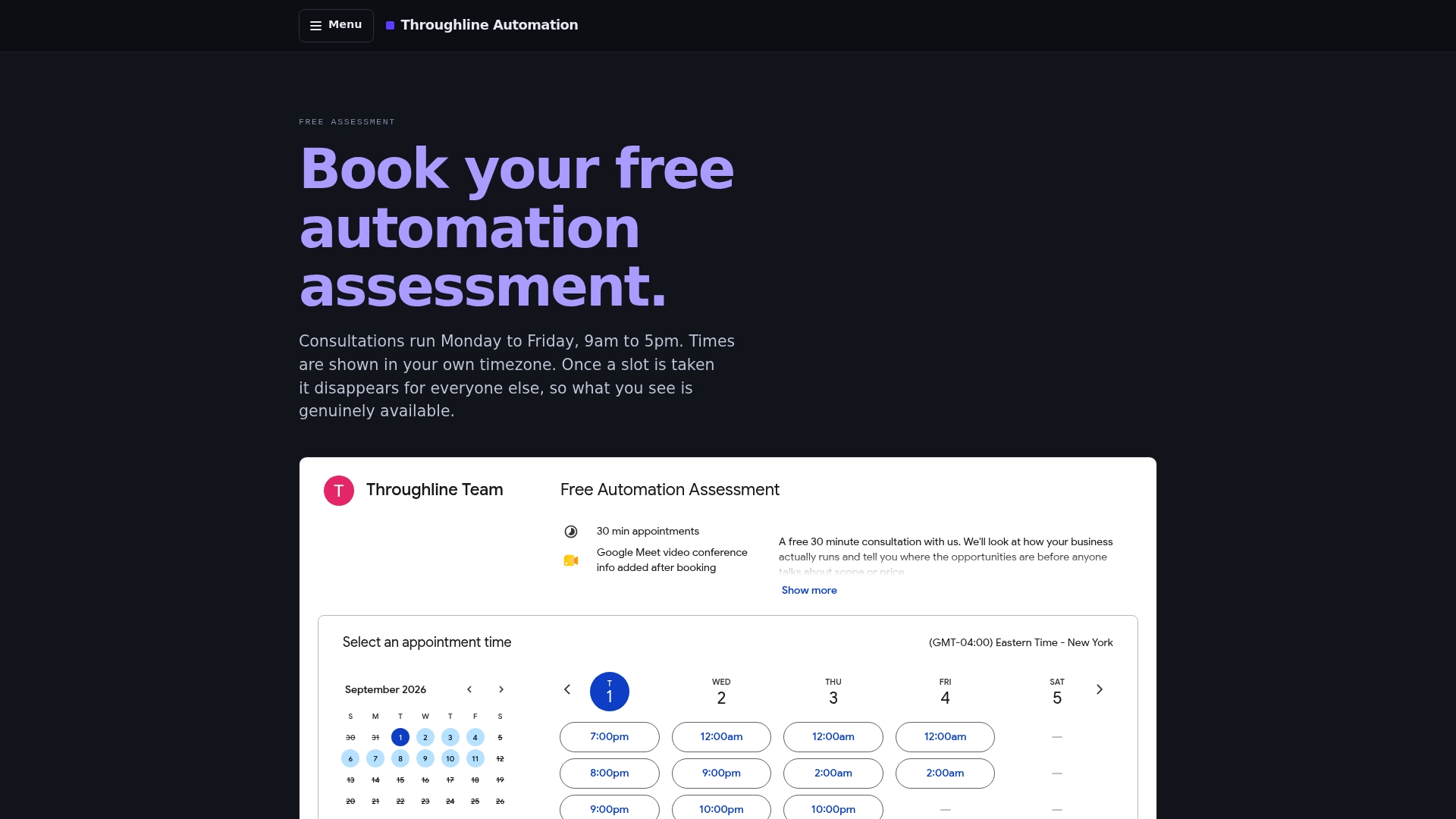
Throughline Automation is the practical alternative to a full software replacement: instead of migrating your team onto a new platform, we build the automation layer around the tools you already use, so nothing your staff know how to operate gets ripped out. The 30 minutes covers your worst manual workflow, the systems it touches, and how often it happens, and you walk away with a clear view of whether it is a strong candidate for a pilot.
Come prepared with one workflow, the tools involved, and roughly how many times a week it happens. That is enough for us to give you a realistic read on cost and timeline. From there, businesses ready for a full rollout move into the 90-day transformation process, which maps, builds, and hands over the automation with measurable savings attached.
Book your free automation assessment and bring your worst manual task. It is the fastest way to find out what automating it would actually look like.
Sources
For deeper technical detail beyond this guide, the workflow automation guide for mid-size companies covers connector tools versus custom code in more depth. The API integration options for legacy systems breakdown expands on CSV bridges and change data capture.
For finance teams specifically, SzopaLabs’ guide on extracting invoice data automatically walks through practical extraction techniques. Throughline Automation’s own integrations page explains how these patterns apply across the systems already in use in most Australian and New Zealand businesses.
- Quartz — Time-saver productivity data
- KUMO — Workflow automation guide for mid-size companies
- Lovely Pixel — API integration options for legacy systems (Australia)
- ClearSeams — Parallel run best practice
FAQ
What are some examples of automated processes?
Common examples include invoice data entry, onboarding emails for new staff, timesheet processing, lead routing between sales and operations, and weekly reporting that pulls numbers from multiple spreadsheets into one summary.
What are the key differences between manual and automated processes?
A manual process relies on someone re-typing, checking, or moving information by hand every time it runs. An automated process does the same steps through software, triggered by an event or a schedule, with a human only reviewing exceptions.
How do you automate a manual process without replacing your systems?
Pick one high-value workflow using a scoring method like PIE, choose a non-invasive integration pattern such as a CSV bridge or connector platform, then run the automation in parallel with the manual process for at least 30 days before switching over fully.
How long does a typical automation pilot take to build?
Most pilot workflows take 2 to 8 weeks to build, depending on how many systems are involved and how clean the underlying data is, with simple connector-based pilots landing at the faster end of that range.
Do you need to replace your CRM or accounting software to automate around it?
No. Patterns like CSV-to-API bridges, webhook shims, and iPaaS connectors are built specifically to automate the work happening between systems without touching the systems themselves, which is the approach Throughline Automation uses across every engagement.